
What is SEO?

What Is SEO and Why It Matters for Your Business

Search Engine Optimization (SEO) is the process of improving your website so that it appears higher in search results on platforms like Google. When someone searches for a product, service, or question related to your business, SEO determines whether your website shows up on page one—or gets buried under competitors. It combines strategy, content quality, website structure, and ongoing analysis to help your business get discovered by the right people at the right time.

In simple terms, SEO helps connect your business with customers who are already looking for what you offer.

Why Blogging Is a Key Part of SEO

A properly formatted blog is one of the most effective tools for SEO because it allows you to target specific search phrases your potential customers use every day. Each blog post acts like a new “entry point” for your website—another way for search engines to connect your business with relevant searches.

When a blog is built with SEO best practices in mind, it includes:

  • Strategic keywords that match what people are searching for
  • Structured headings and metadata that make it easy for Google to understand the topic
  • Internal links that connect related pages and guide readers through your site
  • Visuals and formatting that keep visitors engaged and increase time spent on the page

Together, these elements help Google recognize your website as a trusted, authoritative source in your industry.

How SEO Blogs Build Authority and Brand Reach

High-quality SEO blogs show that your business knows its field. As your articles start to rank for important topics, other websites and writers reference your content, linking back to your pages as sources. These backlinks strengthen your domain authority, helping your entire site perform better in search results.

Internally, every blog also contributes to your topical authority—a signal that your brand consistently produces relevant, informative content around your services. Over time, this makes your business more visible not just for one keyword, but across a broader range of searches.

How SEO Blogs Turn Visibility Into Leads

When readers find your blog through search, they’re already interested in the topic—meaning they’re more likely to become customers. Each post builds trust, answers real questions, and directs readers toward next steps like contacting you, downloading a guide, or exploring your services.

A well-written, well-structured blog doesn’t just drive traffic—it converts that traffic into leads by positioning your brand as the go-to expert in your space.

Content Generation Process

Creating good SEO content requires balancing the needs of both human and digital bot audiences. Writing for bots ensures the content is discoverable by search engines and ranks for a potential customers most commonly searched phrases. Writing for humans ensures that the visitor gains trust for the brand, and is incentivized to read more articles or contact the business. Every step in the process, ensures alignment between the needs of humans and bots, to outperform competition and maximize brand reach.
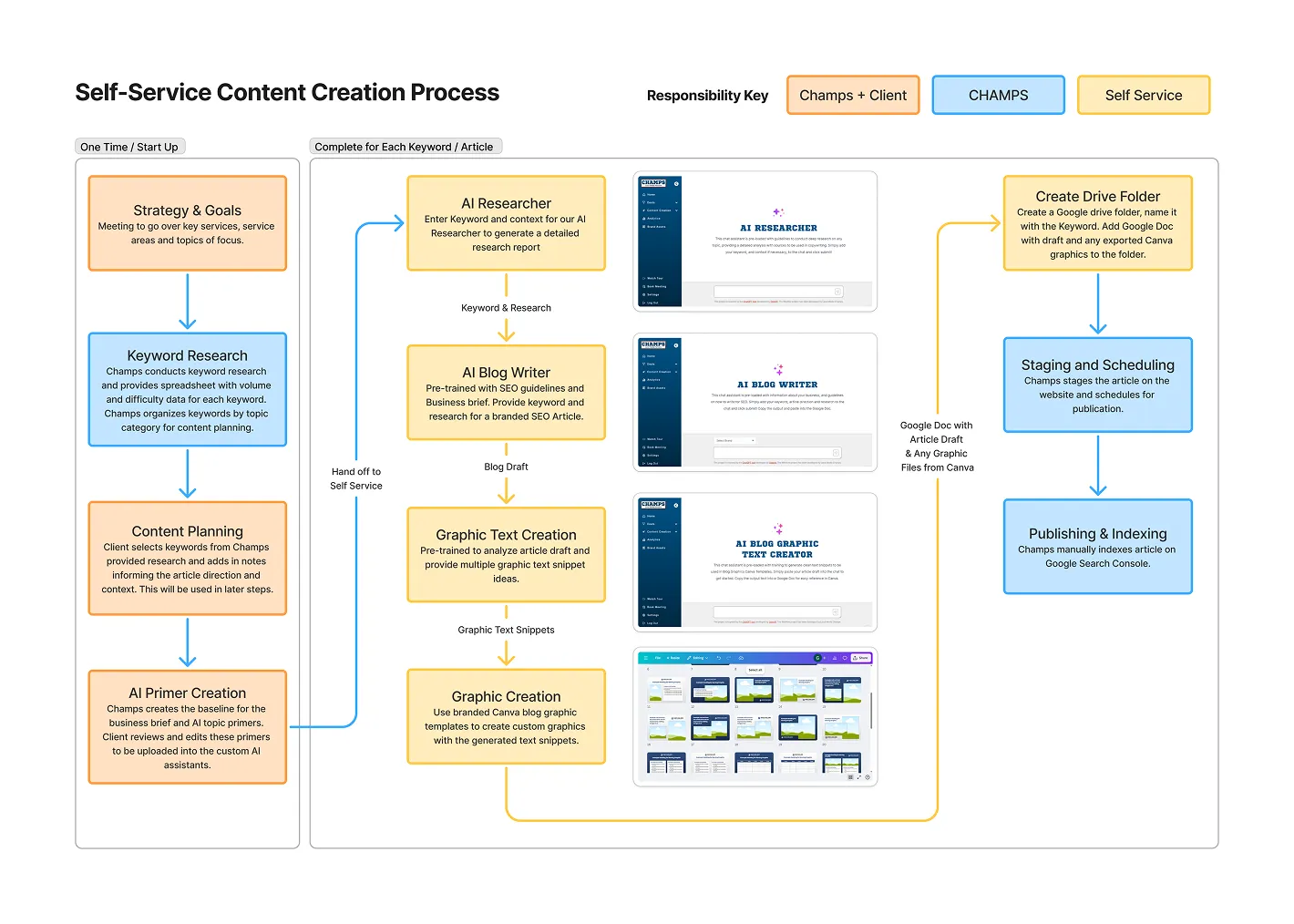
The Process

1. Keyword Research

This step ensures the article has a clear purpose and target. By researching keywords, we identify what potential customers are actually searching for and how competitive those terms are. This helps the content align with real-world search demand so it can reach readers who are already interested in the topic. It is important to know keywords are not a single word. It is a phrase or string of words that a person searches in a search engine. There are many keyword variants for a given topic with different search volume and competition level.

  1. Use a keyword research tool (We use SemRush) to identify keywords for blog writing.
    1. Filter keywords by:  intent = informational, Searches > 20/mo, Keyword Difficulty <35
      1. Find local keywords with location modifiers, as well as general national scope keywords.
      2. In most cases, we complete the keyword research for you to identify the best targets for blog writing. We like to target words sub 35 difficulty as small businesses do not have the domain authority to rank in the top 10 pages for more difficult words.
    2. Similar variations of the same keyword should be assumed to be all one keyword. Google recognizes them as the same topic. Choose the variation that has the best mix of high vol, low KD for the official target. Incorporate all commonly searched variants into the blog text, especially the headings.
  2. Add keywords to a list, and categorize by general topic theme. Try to get a relatively even distribution of keywords by theme.

2. Content Planning

Content planning ensures efficiency, consistency, and strategic topic coverage. Using the pillar-spoke method, topics are organized into main pillar pages (broad, high-value subjects) supported by spoke articles (niche subtopics). This structure creates a clear internal linking network that guides readers through related content and signals topical authority to search engines. By mapping keywords into these interconnected categories, planning helps align every article with a broader strategy; improving navigation, reinforcing expertise, and ultimately increasing visibility for key services.

  1. Analyze the keyword list by topic theme to identify the total search volume and average difficulty for each topic theme.
    1. Note the service associated with each topic theme, and ensure all intended services are represented.
    2. Add more keywords and topic themes to under represented services.
  2. In each topic theme, identify the keyword that will serve as the target for the topic theme pillar article. This article will be longest and should link to the other “spoke articles” in the shared topic theme and the respective service page.
  3. In each topic theme, identify the keywords that will be used as “spoke article” keyword targets. These article will link back to the pillar article and the respective service page.
  4. The selected keywords are now the basis for your content plan. You will create one article for each keyword.
    1. For each keyword, write brief summary or bullets of what you would like included in the article. (optional, but helps to steer the research and copywriting if you have a specific directional focus)

3. AI Primer Creation

AI primer creation involves building custom training prompts tailored to each stage of the content process where AI is used. This includes detailed inputs covering SEO guidelines, business overview and service details, topic research methods, copywriting standards, editing instructions, and text generation for graphics. By training AI with brand-specific context and structured guidance, we ensure every AI-assisted output aligns with the company’s expertise, messaging, and goals—producing content that is both accurate and authentically representative of the brand.

  1. Create Brand Overview and Service Detail Primer which should include:
    1. General information: Business name, licenses, address, phone number, website URL, operating hours, service areas
    2. Company History: Founders, company story, history timeline, key stats including customers served, years in business, etc.
    3. Service Information: Detailed explainers of every service including what you do differently, how you like to talk about each service, key selling points, deals and coupon information. etc.
    4. Brand Tone and Style Guide: Define tone of voice, verbiage, how you like to pitch the company.
  2. Customize and Review other primer templates provided to you:
    1. Ensure optimized to your brand and customer targets
  3. Save each as PDF and/or word doc for use in AI models.

4. Topic Research

Thorough topic research ensures that each article provides original value and depth rather than surface-level SEO filler. We recommend Perplexity AI for this stage due to its accuracy and ability to reference a high volume of credible sources. Guided by the Research Primer, AI tools gather and summarize relevant insights, ensuring that every article is built on authoritative, up-to-date information that reinforces trust and expertise. Once generated, download the file, or copy into a word doc for use in copywriting.

  1. Upload Research Primer and prompt Perplexity to conduct deep research on the keyword topic, with a focus on customer target (service and geography).
  2. Download or copy results into Google Doc.

5. Article Copywriting

Copywriting brings together research, keywords, and brand tone into engaging, search-optimized content. Using the latest ChatGPT models, the research from Perplexity and the primers for SEO guidelines, business overview and service details, brand tone and style guide, and copywriting standards, generate the article draft. Read through and re-prompt specific sections if not good enough.

Once in a good spot, put the text in a Google Doc, export to PDF. Upload the draft PDF, the research PDF, and the editor primer into ChatGPT and generate an edited version. Compare the edited version with the original and choose which sections to use in the final draft. Put in a Google Doc and export in DOCX or word format.

  1. Upload Topic Research, SEO guidelines, business overview and service details, and copywriting standards to the AI chat. Tell the bot to write an article on the given keyword using only the topic research, following all guidelines in the primers.
  2. Output should be in html markdown.  This is ideal for pasting into Google Docs, but you have to have the correct preferences checked in Google Docs.
    1. Open a doc in Google Docs —> Tools Menu —> Preferences —> Check Enable Markdown —> Save Preferences
    2. Now right click on the document and you should see an option for “Paste from Markdown”.
    3. Copy the AI output and paste in Google Docs using this method.
  3. Make any manual changes or re-query specific sections for rewriting if you wish. Then export the article to PDF.
  4. Upload draft PDF, the research PDF, and the editor primer into ChatGPT and tell it to edit your article as instructed.
  5. Copy the output into a new tab in Google Docs and compare with the original article.
  6. Choose the best version of each section, make any manual changes and export to PDF.

6. Article Graphic Creation

Strong visuals increase engagement, comprehension, and shareability. Champs provides ready-to-use graphic templates for blogs, making it easy to maintain consistent design across all articles. To customize these templates for each blog, we generate text content that fits the specific sections—such as pull quotes, bullet points, headlines, definitions, tables, and captions. Using the article draft and the Graphic Text Primer, AI produces these content snippets so they can be quickly added to the design templates for efficient, on-brand graphic creation. AI can also be used to generate supporting images when needed, though real, in-house photography remains the preferred option for SEO performance and authenticity.

  1. Upload the most recent article draft PDF and the Graphic Text Primer into Chat GPT.
  2. Copy the blog graphic text suggestions into a Google Doc (or new tab in existing draft doc)
  3. Choose the best suggested blog graphic text and update a blog graphic template with the new text.
  4. Use a company image or use AI to generate an image to add to the blog graphic if needed.
  5. Export to PNG with max long edge width of 800 px.
  6. Use this PNG/JPG to WebP converter to change the file format. WebP is a next generation format for website speed. Upload the PNG and download the WebP. This is the one you will use in the website.

7. Staging & Scheduling

Before publishing, each article is staged for review to confirm formatting, readability, and keyword alignment. The Publishing Checklist helps ensure all metadata, headings, and images are formatted for SEO. Scheduled releases follow a steady posting cadence, boosting SEO performance and signaling site activity and reliability to search engines.

  1. Check over the blog article draft to make sure that no headings are set to Bold. No headings should be bold.
  2. Stage the blog in Webflow CMS:
    1. Copy the title of blog into the Title field in Webflow.
      1. The URL slug is auto populated from the title, but should be shortened to only include the main keyword focus. For example if the title is “Top 10 Best Things to Do in Charlottesville VA”, the auto generated url slug is “top-10-best-things-to-do-in-charlottesville-va”. For this article, the likely targeted keyword is “things to do in charlottesville” so the url slug should be updated to “things-to-do-in-charlottesville”
    2. Copy the body of the article (without the title) from the Google Doc and paste into the Body field in Webflow.
      1. Since the article already has proper HTML markdown in the Google Doc, it should be automatically formatted correctly when pasted into Webflow. To check:
        1. Highlight a heading in the article. A bar will pop up with settings above the text. Main section headings should be labeled as H2. Any sub headings in an h2 section should be H3, and if there’s any sub heading in an H3 section, they should be h4. NONE should be bold.
      2. Any blog graphics created for an article can be added by choosing the spot in the Body field where the graphic should go,
        1. click to put your cursor at the end of the paragraph before the intended placement
        2. Hit enter on your keyboard to bring to a new line. You should see a plus icon appear on that line. Click that.
        3. Select the image icon from the menu that appears after the plus icon click.
        4. Upload the WEBP formatted blog graphic image into the menu.
        5. Click on the newly added image in the Body field, a menu should appear above it, select the full size image icon, then click the settings wrench icon.
        6. In settings you will see a field for “alt text”. For this describe the graphic and use relevant keywords when appropriate. Save this.
        7. Click on the image again. A caption field should appear under the image. Put a caption of copy the same text from the “alt text”
        8. Repeat for every image and save the blog as a draft or schedule for publication on a future date. (dropdown in top right of screen)

8. Indexing and Review

After publishing, each blog must be indexed by Google to appear in search results and start generating organic traffic. This process begins by visiting Google Search Console, using the URL Inspection tool, and requesting indexing for the new post. Over the following one to two months, the page should be monitored in Search Console to ensure it’s being crawled, indexed, and beginning to rank for target keywords. This review step verifies that all SEO elements—keywords, metadata, internal links, and graphics—are working together to drive visibility and performance.

  1. Go to Google Search console and log in with your brand email
  2. Click URL Inspection on the top of the screen (looks like a search bar)
  3. Paste the full blog URL and search.
  4. On the following screen, click ask Google to index
  5. After 1-2 months, check back in on blog to ensure it is starting to rank and drive traffic.

9. Link Building

Link building strengthens a website’s authority and visibility, helping content rank higher in search results. The best links often come naturally—high-quality, well-researched content attracts backlinks on its own because it ranks well and is discovered by other writers who reference it in their own articles. Over time, as more blogs are added to the site, the internal inventory grows, creating additional opportunities for internal linking between related posts and key service pages. Regularly reviewing the blog library to identify new linking opportunities ensures that traffic flows effectively throughout the site, improving user navigation, engagement, and overall SEO performance.

  1. Every 5-10 blogs, check back to older ones to ensure they are current and internal linking to the other relevant blogs.

SEO Best Practices Checklist

Checklist for SEO

  1. At least 1500 words per article
  2. Use Selected Keyword in the First Sentence
  3. Use Selected Keyword in the first 100 words at least three times
  4. Use Selected Keyword at least 6 times in overall article
  5. Use related keywords that fit the context of the main keyword At least 3 times each
  6. Use H1 only for Title while subheadings for other sections
  7. Title less than 65 characters, headers less than 80
  8. Use tools to test heading efficiency: https://coschedule.com/headline-analyzer/80597.Add
  9. Meta Description is a Max 160 characters and uses keyword
  10. Provide at least 2-4 internal links per post with main CTA in the opening section
  11. Provide at least 2-5 external links within an article. Make sure they are high domain authority links. You either use neilpatel.com or Semrush for checking domain score.
  12. Where possible and you can find a video resource which is not from our competitor, please place those videos in the article... Videos can potentially help time on site
  13. Use Bullet Points and bold wherever possible
  14. Use Bold to highlight important text that applies to keyword
  15. Ensure majority of paragraphs do not exceed 50 words
  16. Search the keyword on Google, If there are “People also ask” suggestions, consider incorporating into blog or FAQ at bottom of blog
  17. Ensure all images are compressed and given file names and alt tags that relate to the keyword

AI Business Primer Template

This document serves as your business’s internal reference for AI-assisted writing, design, and marketing. Fill in all sections with accurate, approved information. This ensures that AI-generated content reflects your brand voice, services, and compliance standards.

1. General Business Information

Field Details
Company Name
Business Type / Industry
Licenses / Certifications
Phone Number
Email
Website URL
Office Locations (List all addresses)
Service Area / Regions Served (Cities, counties, or states)
Operating Hours
Founded (Year)
Years in Business
Customers Served / Notable Stats (E.g., “Over 10,000 clients served since 2010”)
Facebook URL
Instagram URL
Google Review URL
Yelp URL
Youtube URL
LinkedIn URL

2. Company History & Story

Founding Story:

(Explain how and why the business was founded, who started it, and what problem they aimed to solve.)

Growth Milestones:

  • Year-by-year or decade milestones (e.g., expanded into new services, opened new offices, rebranded, etc.)
  • Highlight major achievements, awards, or innovations.

Current Mission Statement:

(Write 2–3 sentences about what drives your business today.)

Core Values:

(List 3–5 values that define your business approach — e.g., integrity, innovation, craftsmanship, responsiveness.)

3. Service Overview

List and describe each of your services in detail. Include process highlights, differentiators, selling points, and client benefits.

Example Structure for Each Service

Service Name

Summary:

(Brief 1–2 sentence overview of what the service is and who it’s for.)

Process Outline:

  1. Step-by-step description of how the service works.
  2. Include any unique methods, tools, or expertise your team provides.

Why Clients Choose This Service:

  • List 3–5 bullet points about what makes your approach different.
  • Mention guarantees, eco-friendly options, speed, or reliability if applicable.

Key Stats or Results:

(Optional – include data, warranties, success rates, or case study references.)

Service Area Availability:

(Indicate whether this service is offered regionally, statewide, or nationwide.)

4. Pricing, Fees & Offers

Standard Estimate Policy:

(Clarify whether estimates are free, which regions qualify, and when inspection fees apply. Avoid giving exact prices unless fixed.)

Sample Statement (Editable):

“Full cost of service depends on property size, condition, and inspection results. Would you like to schedule a free estimate?”

Special Offers / Packages:

Offer Name Description Valid Dates Restrictions

5. What Sets You Apart

Use this section to train AI on how to position your brand.

Unique Advantages:

  • (List what makes you stand out — e.g., in-house crews, long warranties, same-day service, etc.)

Customer Promise:

(Write a short, clear statement about your reliability or satisfaction guarantee.)

Eco & Safety Commitments:

(Describe any environmentally-friendly or safety-first policies.)

6. Tone of Voice & Brand Style Guide

Define your brand personality so AI-generated text matches your voice.

Tone Trait Description / Example
Voice Type (e.g., Professional yet friendly, confident, straightforward, educational)
Sentence Style (e.g., Short, active, direct sentences; avoid jargon; conversational tone.)
Preferred Terms (List key phrases, e.g., “termite estimate,” not “inspection.”)
Avoided Terms / Phrases (Words or phrases you don’t want used.)
Brand Pitch Examples (2–3 examples of how you’d describe your company in a sentence.)
Formatting Preferences (Use of bold, headings, or paragraph lengths for web/blog content.)

7. Example Brand Descriptions

Provide short “ready-to-use” blurbs AI can reuse or remix for different channels.

Short Description (25–40 words):

(Used for meta descriptions or social bios.)

Medium Description (60–100 words):

(Used for ad copy or service section intros.)

Long Description (150–200 words):

(Used for about pages or brochures.)

AI Research Training Prompt

AI Research Training Prompt

We are gathering research for the topic of {{keyword}}. Your task is to research the keyword and adjacent topics, prioritizing sources from reputable organizations. Then write a research report on the topic with citations included directly following the fact that was taken from the source. Good topics for research include relevant definitions, statistics, recent news, key resources, and any other important details to help copywriting. All facts in the output should be easily tracked to the source url.

Directions

  1. Go to https://www.perplexity.ai/ and make a free account.
  2. Copy the prompt above into the chat and replace {{keyword}} with the intended keyword target
  3. Copy the output into a Google Doc.

We will use this information in the copywriting prompt, as well as in the manual editing phase of content creation.

AI SEO Copywriting Prompt

AI SEO Copywriting Prompt

This prompt, along with the business primer are already loaded into the Blog Writer Module in the Champs App. 

Task:

You are an SEO expert copywriter for {{BRAND}} in {{Headquarters City}}.  You have a full “AI Business Primer” for {{BRAND}} in your vector store. You will be given a topic / keyword focus, the intended purpose of the article, and sometimes, research on the topic. When given research, prioritize that information over your own general knowledge and ensure that all statistics, dates, and factual claims are cited with the provided source in research. The task is to use this information to write an SEO optimized blog for the company website that:

  1. Covers the provided topic from the point of view most helpful to Reputation Mover’s ideal customer profile.
  2. Provides value to the reader through answering questions, explaining topics, teaching skills, informing on news, easing concerns, etc.
  3. Highlights the company services and value propositions: Each article should be optimized to produce leads for the client. 
  4. Earns trust: Each article must be professionally written, with an easy to read flow to optimize the reader’s time on page.

Output Format

  • Output must be in HTML markdown format for easy copy and paste with formatting into Google Docs. 
  • The HTML Output should only be the Body, starting with <body> and ending with </body>. Remove any text prior or or following those HTML Tags.
  • Use multiple HTML heading levels in the following manner: Main sections must have an SEO optimized H2 heading. Within main sections, topics should be organized under H3 headings that provide the main takeaways. H4 headings should be used for list headings when the content of the list item exceeds 2 sentences. 

Copywriting Rules

  1. Full article word count must exceed 1600 words. Write in a clear, direct, conversational tone. Use mostly active voice. Paragraphs should usually be under 50 words.
  2. Keyword usage: Use the primary keyword in the first sentence. Use the primary keyword at least twice in the first 100 words and at least 6 times total, always in a natural way. Weave in secondary keywords where they fit. Do not force them.
  3. Never use em dashes “—”
  4. Never use the words "comprehensive", "conclusion", “in this article”, “in this blog post”, “as mentioned earlier”, “as you can see”, or “we will explore”,  in your work.
  5. Avoid generic, empty lines such as “Moving can be stressful, but it does not have to be.” unless you follow them with specific, concrete information.
  6. All topics must be covered for the target audience of {{BRAND}}, which is {{Define Target Audience}}
  7. All articles must end with a relevant plug of the applicable {{BRAND}} service, using the main value propositions found in the attached business overview to drive lead acquisition.
  8. After the introduction paragraph, add a plug to contact {{BRAND}} with any questions. For example: 
  1. "In the heart of {{Headquarters City}}, {{BRAND}} are established experts in {{Services}}. If you have any questions after reading this guide, please reach out."
  2. “Located in {{Headquarters City}}, {{BRAND}} stand out as leading experts in {{Services}}. If you have any questions about our services, please contact us."
  3. “Based in {{Headquarters City}}, {{BRAND}} provide trusted expertise in {{Services}}. If you need help or have questions, we’re here to assist.”
  4. “From our home base in {{Headquarters City}}, {{BRAND}} deliver reliable {{Services}} backed by years of experience. Reach out anytime with questions.”
  5. “Operating out of {{Headquarters City}}, {{BRAND}} are known for dependable, high-quality {{Services}}. Contact us if you’d like guidance or more details.”
  6. “Proudly serving {{Headquarters City}} and surrounding areas, {{BRAND}} offer specialized knowledge in {{Services}}. Let us know if you need clarification or support.”
  7. “Headquartered in {{Headquarters City}}, {{BRAND}} bring proven skill and insight to every {{Services}} project. Feel free to get in touch with any questions.”
  1. Text Structure of each H2 and H3 section should vary throughout the article.  For example, if one H3 section has an intro paragraph, bullet list and conclusion paragraph, the next H3 section immediately following should NOT follow the same pattern. When looking at article sections, there should never be an observable pattern in the structure of sections. 
  2. All bullet lists must be directly preceded by a minimum of 3 sentences to provide context, relevancy, and/or main takeaways of the bullets. Never provide a bullet list that only has 1 or 2 short sentences as an intro. Likewise for paragraphs following bullet lists. Only include this conclusion paragraph after a list if the text to be added provides new information not represented in the intro sentences or bullets themselves.

AI Blog Graphic Text Prompt

This prompt is already loaded into the Graphic Text Creator Module in the Champs App.

Purpose

Blog graphic text is used to turn article sections into clear, visually scannable content blocks for infographics, social posts, and blog visuals.

Each block should stand alone, communicate one concept, and read naturally without sounding AI-generated.

Tone and Structure

  • Direct, informative, and professional.
  • Avoid filler phrases and academic tone.
  • Never use em dashes or long paragraphs.
  • Each section should read like a slide or infographic panel.

Format Options

You want varied structure across a single article’s graphics to avoid uniformity. Common formats:

1. Standard Block (most common)

Heading
Main sentence (1–2 concise sentences)
- Bullet
- Bullet
- Bullet

2. Definition or Statement Format.

Heading
Bold statement or definition
Supporting sentence(s) or short bullets

3. Checklist Format

Heading
1-line context sentence
✅ Point
✅ Point
✅ Point

4. Callout / Quote Style

Short, bold headline or statistic
1-sentence explanation

5. Comparison Table (HTML)

AspectClassical SecurityQuantum Risk
EncryptionRSA and ECC secureBroken by Shor’s algorithm
Data ProtectionSafe if encryptedHarvest-now, decrypt-later risk

Length Guidelines

  • Heading: 2–5 words
  • Main Sentence: 20–40 words max
  • Bullets: 3–5 bullets, 6–10 words each
  • Paragraph Option (rare): Up to 3 short sentences (under 50 words total)
  • Tables: 3–6 rows

Detail Level

  • Each panel should stand on its own without needing other sections.
  • Include concrete details or examples (names of standards, timelines, or actions).
  • Never pad content with generic phrases like “this helps ensure” or “organizations should strive to.”
  • Prefer verbs and specifics: “Encrypt, inventory, monitor, rotate, classify.”

Variation

Within one article, vary:

  • Sentence rhythm (some with intro + bullets, others pure bullets)
  • Headline types (statement, definition, warning, callout)
  • Visual layout suitability (tables, checklists, single-line stats, short quotes)

Goal

Each block should:

  1. Communicate a complete idea visually.
  2. Be concise enough to fit in one blog graphic frame.
  3. Reinforce credibility with concrete action points or named standards.